Budget the way you actually spend.
Real life spending doesn’t happen neatly by calendar month. Trips, festive seasons, weddings, subscriptions, and one-off events often stretch across different dates and budgets.
Track income, expenses, savings, and multiple budgets so you can see your true spending patterns and make better money decisions.
Free to start — no credit card, no bank linking.
Budget by event
Month, trip, season, project — budget the way life actually happens.
Bring your own data
Import from Excel. No bank credentials. No geographic limits.
No bank link required
Your bank credentials never leave your bank. You control what goes in.
Budgets with a start and an end date.
Most finance tools assume your life fits in calendar months. This one doesn’t. Give a budget a date range — a trip, a wedding, a project — and optionally mark it recurring to replay every year.
- One-off events: "Bali trip, May 1 – May 14"
- Recurring seasons: "Ski season, Nov 1 – Feb 28, every year"
- Year-crossing windows handled correctly
- Runs in parallel with your normal monthly budgets

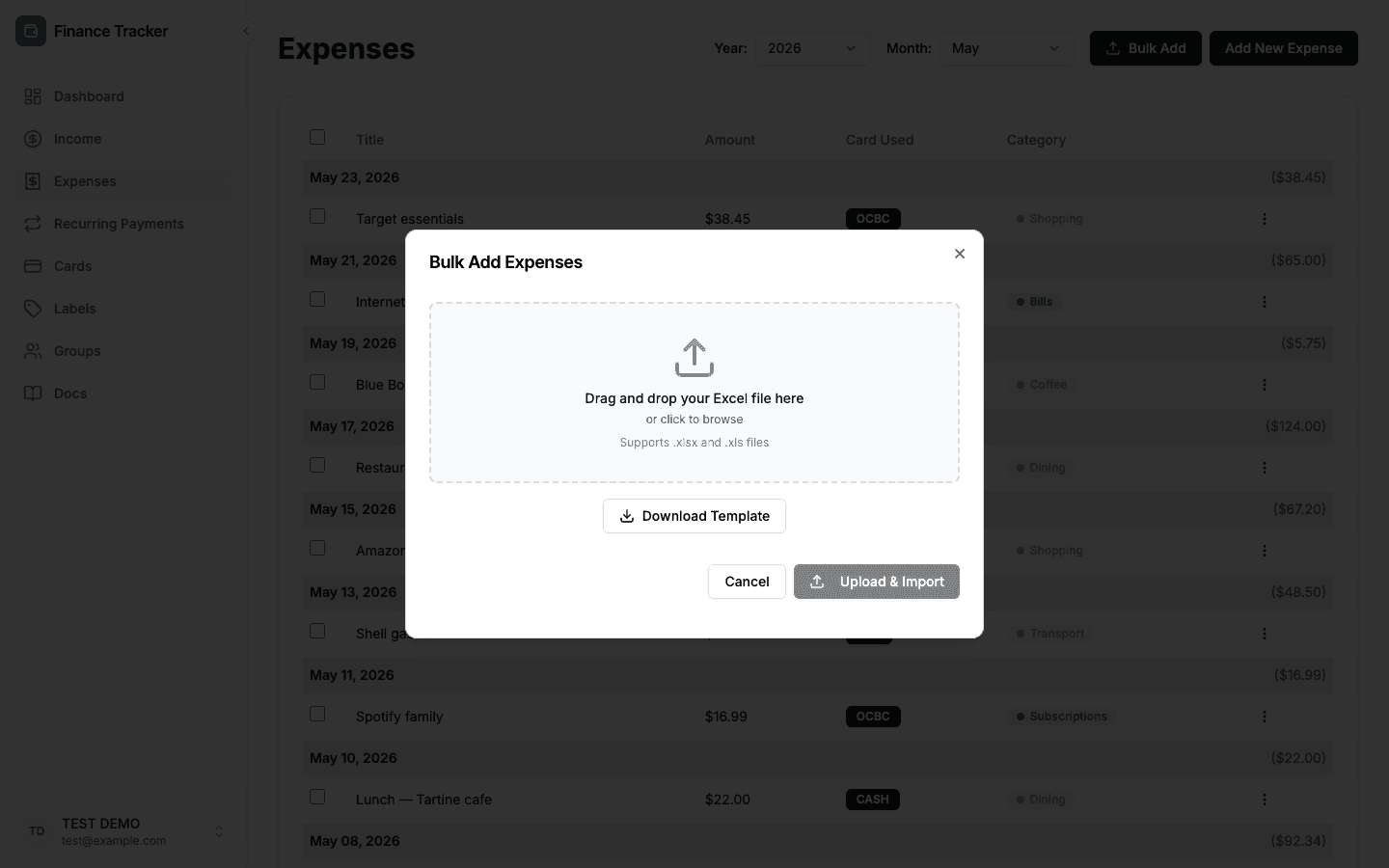
Upload a spreadsheet. Skip the bank link.
Bulk-import expenses from Excel or CSV. Download a template, upload your file, review parsed rows with per-row validation, then confirm. No Plaid, no credential sharing, no regional limits.
- Multi-sheet files and multiple category columns
- Inline validation — see errors before they save
- Auto-tag with label matching strings
- Works for cash, multi-currency, and non-US banks
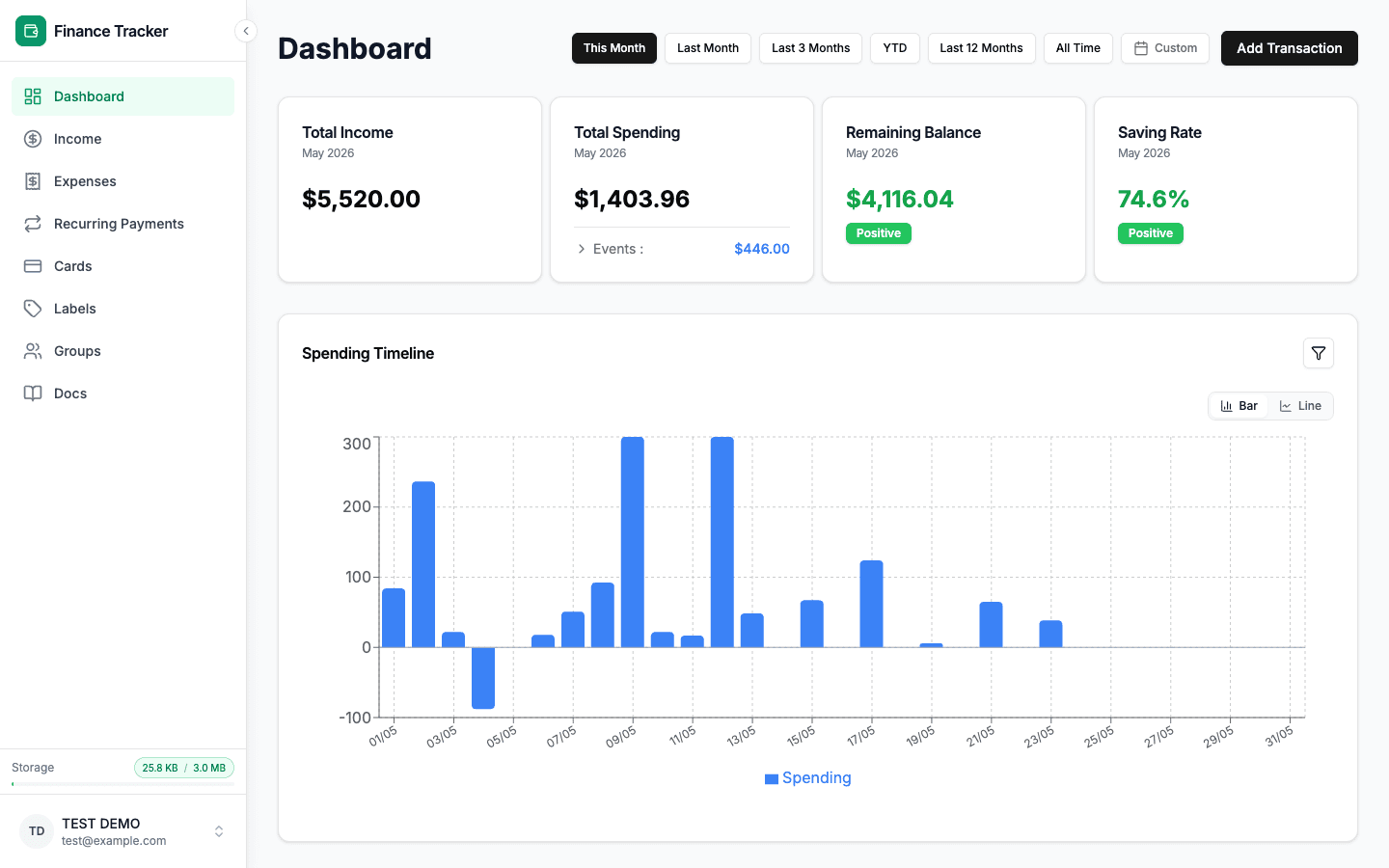
One dashboard, every angle.
Switch year, month, or active event and the whole dashboard recalculates. Income, expenses, balance, and saving rate update instantly — and a daily timeline shows you exactly when the spending happened.
- Income, expenses, balance, and saving rate at a glance
- Year, month, or event filter — all charts move together
- Daily spending timeline surfaces spikes a monthly view hides
- Hover any point for the exact day and amount

Flexibility where most tools are rigid.
Built for the way you actually think about money, not how a category-first schema thinks you should.
Many labels, one transaction
Tag an expense with as many labels as you need. Budget groups are composed from label sets — a dinner can count toward both Dining and Business without split-transaction gymnastics.
Record-only groups
A group with no cap — pure observation, no 'you're over budget' warnings. For things you want to track but not limit: medical, gifts, gear.
Cards you actually use
Add and rename your own payment methods — joint account, employer card, that one travel card. Tag every expense with the card that paid. No bank linking.
Subscriptions on autopilot
Track recurring payments with daily, weekly, monthly, yearly, or custom N-day frequencies. Activate, pause, or end on a date.
Designed for the phone in your hand
Responsive from day one. Three iterations of mobile polish — touch targets, sticky dialog footers, collision-aware popovers. Not a shrunk desktop.
Multi-period dashboard
Month filter, year filter, active event filter — see exactly the period you care about. Donut, timeline, table views, all filterable by label.
The boring parts, done right.
You’ll feel this as an app that doesn’t flicker, doesn’t lose data, and doesn’t forget who you are.
Optimistic updates
Click delete, see it vanish. Rolls back on error.
Rate-limited auth
Upstash-backed throttling on login, register, and reset.
Validated end-to-end
Zod schemas on client and server. Bad data does not get in.
Real tests, real DB
Integration tests against a real Mongo, not mocks.
Your financial data is encrypted.
The fields that reveal the most about your financial life are encrypted before they ever reach the database. Amounts stay readable so your dashboard works. Everything else stays private.
We cannot read
Encrypted with AES-256-GCM — ciphertext in the database.
Merchant & expense names
e.g. Starbucks, Netflix, NTUC FairPrice
Card issuers
e.g. UOB, DBS, OCBC, Citibank
Subscription names
e.g. Spotify Monthly, AWS Credits
Your display name
stored as ciphertext, not plaintext
Platform can access
Stored in plaintext because the app requires it to function.
Email address
needed for login and account notifications
Transaction amounts
needed to calculate totals and charts
Transaction dates
needed for timeline filtering
Categories & labels
needed to group expenses on the dashboard
You can export all your data or delete your account at any time from Data & Privacy settings.
Simple, honest pricing.
Start free. Pay monthly if you outgrow it.
Free
For casual personal tracking.
- 100 transactions
- 15 labels, 15 groups, 15 recurring payments
- Bulk Excel/CSV import
- AES-256 field encryption
Pro
Free for beta members.
- 10,000 transactions
- 15 labels, 15 groups, 15 recurring payments
- Bulk Excel/CSV import
- AES-256 field encryption
- Data export & delete
- Priority support
Cancel Pro any time.
Frequently asked.
Do I need to connect my bank?
No. This product is intentionally bank-linkless. You add expenses manually or bulk-import from Excel / CSV — no Plaid, no credential sharing.
What makes event budgets different from monthly ones?
A monthly budget resets on the 1st of every month. An event budget has a start date and an end date — a trip, a project, a season. You can mark events recurring so they replay by month-of-year every year. Monthly and event budgets run in parallel on the dashboard.
Can I use this if I live outside the US?
Yes. Because we don't depend on bank aggregators, geography isn't a constraint. You can track any currency by how you enter amounts, and import from any spreadsheet format.
Is my data private?
Yes. Merchant names, card issuers, subscription names, and your display name are encrypted with AES-256-GCM before being stored — even direct database access can't reveal them. Amounts and dates are stored in plaintext because your charts depend on them. There's no bank linking, so you never hand credentials to a third-party aggregator. You can export or delete all your data at any time.
What is the pricing?
Three tiers. Free covers 100 transactions with 15 labels, 15 groups, and 15 recurring payments — plenty for casual tracking. Pro is $5/month for 10,000 transactions and 15 of each. Lifetime is a one-time $69.90 payment for unlimited everything — pay once, keep forever. See the pricing section for details.
What if I upload the wrong file?
Open the Upload history drawer from the Expenses page. Every batch is preserved with its file name, source, row count, and total — drill into the rows, edit any miscategorized item, delete individual rows, or remove the whole upload in one click. Your transaction count is freed up automatically.
Does it work on mobile?
Yes — it's a responsive web app, polished across three dedicated mobile tiers. Add it to your home screen for an app-like experience.
Start tracking in under a minute.
Sign up, add a couple of expenses or import a spreadsheet, and see the dashboard light up.